

Most people who lift without a log end up repeating the same weights for months. It isn't laziness. It's memory. You walk into the gym on Thursday with only a vague idea of what you did on Monday, so you pick a weight that "feels right," do roughly the same number of reps, and leave. Do that for a year and you've worked hard without getting much stronger.
A weight training log fixes that. It doesn't need to be fancy. A sheet of paper with the right columns does the job. Below you'll find four free templates you can download right now, two printable and two digital, followed by a plain-English guide to what to track and how to use it.
The short version:
• Pick one template: the printable workout log is the best place to start.
• Track the essentials every session: date, exercise, weight, sets and reps.
• Add effort (RPE) and a short note when you can. Those two fields explain most stalls.
• Before each workout, look at last session's numbers and try to beat one of them.
Free Weight Training Log Templates (Download)
All templates are free, with no email sign-up. The PDFs are sized for US Letter paper and also print fine on A4 if you choose "fit to page." Print a stack, keep them on a clipboard in your gym bag, and you're set for the next few months.
1. Printable Workout Log (PDF)
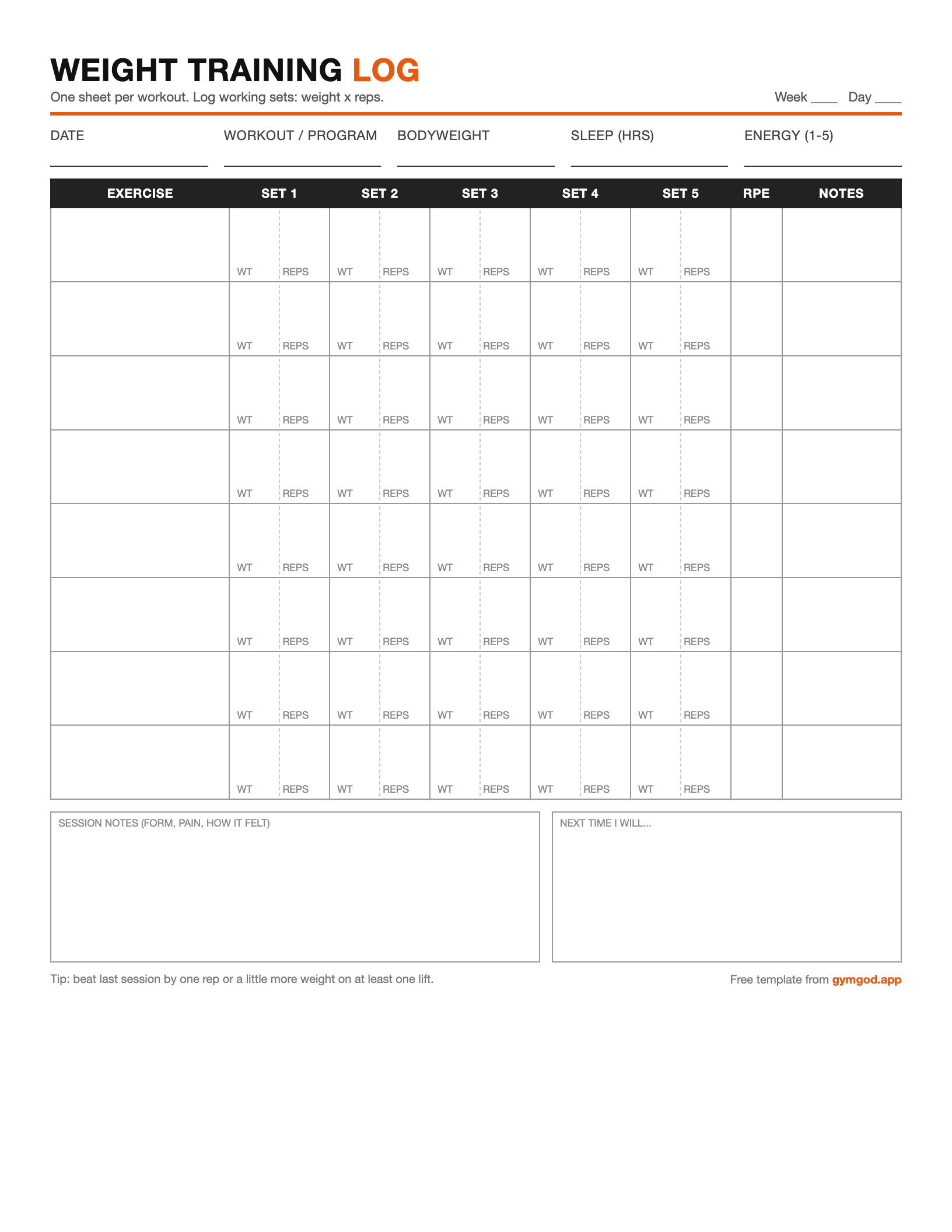
One page per session. Room for 8 exercises with 5 sets each (weight and reps), RPE, notes, plus bodyweight, sleep and energy at the top. Best for: anyone starting out, and anyone who just wants pen-and-paper simplicity.
Download PDF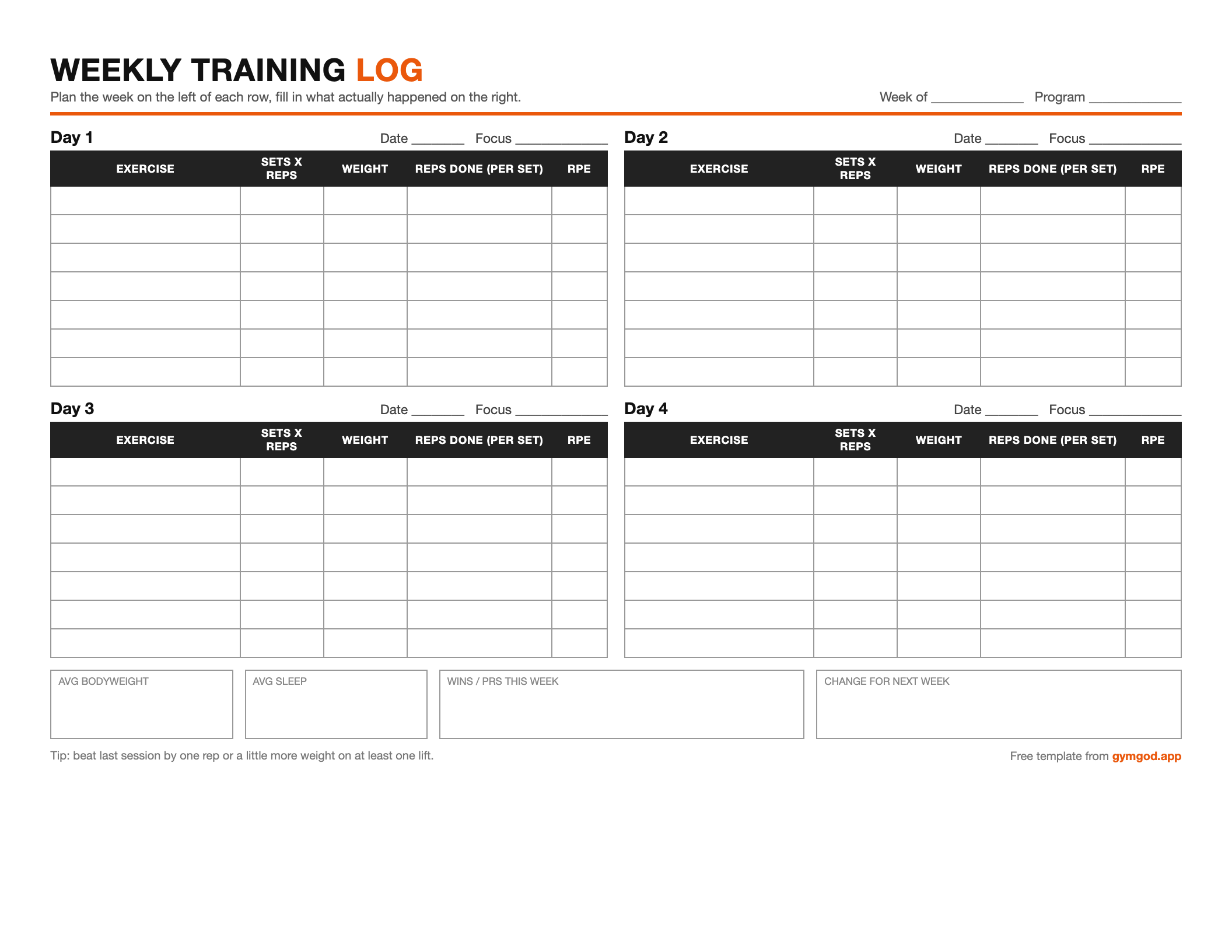
2. Weekly Training Log (PDF)
A whole training week on one landscape page: four training days, planned sets and reps next to what you actually did, and a weekly check-in. Best for: 3 to 4 day splits like upper/lower or full body.
Download PDF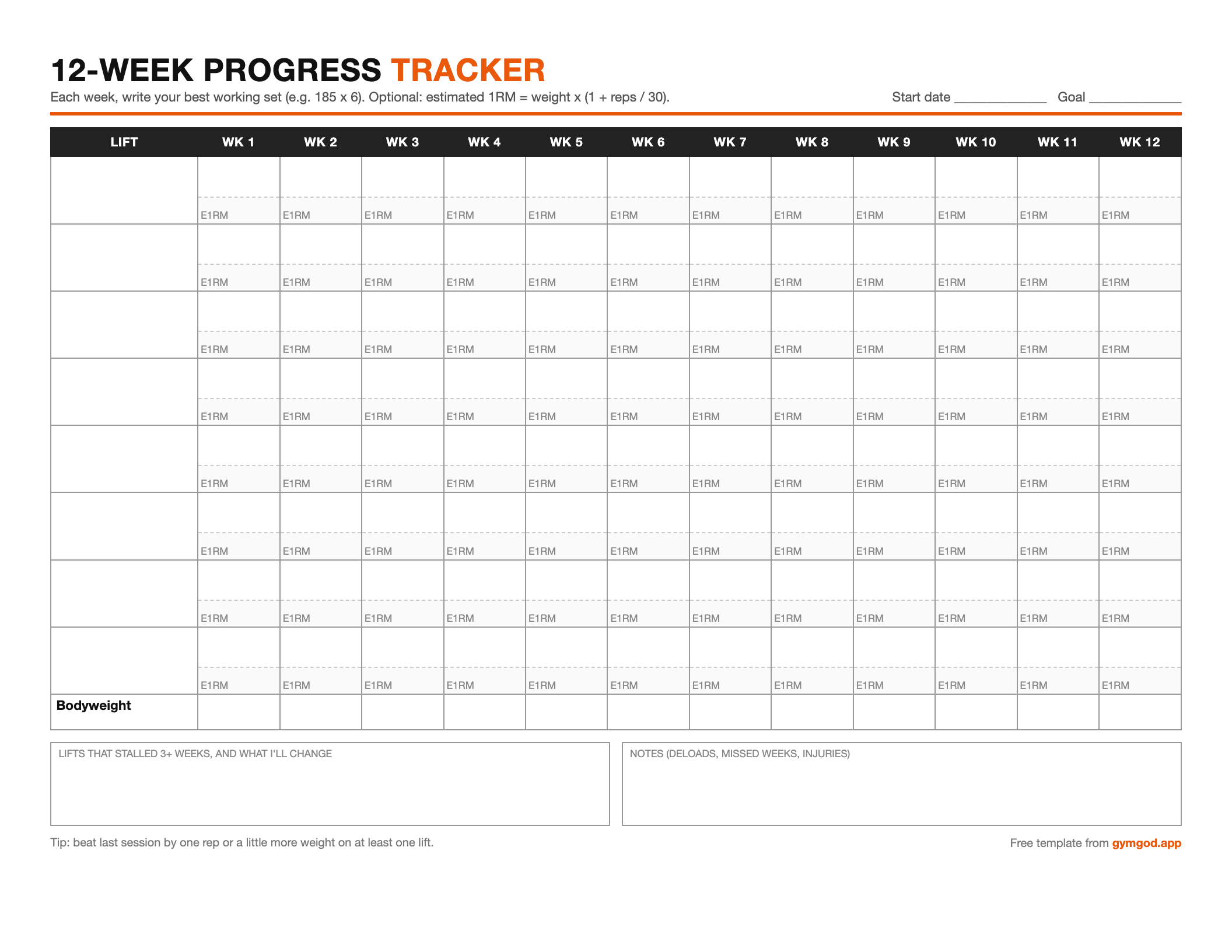
3. 12-Week Progress Tracker (PDF)
One row per lift, one column per week. Write your best working set each week and, if you like, an estimated 1RM. Best for: seeing the big picture on your main lifts over a full training block.
Download PDF| Date | Exercise | Set | Weight | Reps | RPE |
|---|---|---|---|---|---|
| 10/05 | Bench Press | 1 | 185 | 8 | 7 |
| 10/05 | Bench Press | 2 | 185 | 8 | 8 |
| 10/05 | Bench Press | 3 | 185 | 7 | 9 |
| 10/07 | Back Squat | 1 | 225 | 6 | 7 |
4. Spreadsheet Log (CSV for Google Sheets or Excel)
One row per set with date, workout, exercise, weight, unit, reps, RPE, rest and notes, pre-filled with a few example rows. Best for: people who like to sort, filter and chart their own data.
Download SpreadsheetWhat to Track in a Weight Training Log
A good log answers one question quickly: what do I need to beat today? Everything on the templates above serves that question. Here's what each field is for, starting with the ones you should never skip.
The Essentials (Log These Every Session)
| Field | Why it matters | Example |
|---|---|---|
| Date | Shows how often you train each lift and how long a plateau has really lasted. | Oct 5 |
| Exercise | Be specific. Incline dumbbell press and flat barbell bench are different lifts with different numbers. | Barbell Bench Press |
| Weight | The load you'll try to increase over time. Note the unit and, for machines, the seat or pin setting. | 185 lb |
| Reps per set | Log every working set, not just the first. A drop from 8 to 6 reps across sets tells you a lot about fatigue and rest. | 8, 8, 7 |
Worth Adding Once the Habit Sticks
- RPE or RIR (effort): rate each set from 1 to 10 (RPE), or note how many reps you had left in the tank (RIR). An RPE 9 set means about one rep left. Effort is what tells you whether 185 x 8 was easy or a grind, and so whether to add weight next time.
- Rest between sets: if your rest swings from 90 seconds to 5 minutes, your rep counts will swing too. Logging it keeps comparisons fair. (More on that in Your Rest Times Are Too Long.)
- Bodyweight: one number per session or per week is plenty. It gives context to strength changes, especially during a cut or bulk.
- Sleep and energy: a quick "6 hrs, energy 2/5" explains a bad day so you don't panic about it.
- Notes: a few words like "left shoulder pinchy," "new grip," "belt on." This is the field you'll thank yourself for in three months.
Don't over-track. If filling out your log takes longer than your rest periods, you'll quit. Start with the four essentials. Add one extra field at a time, and only keep it if you actually look at it.
How to Fill Out Your Log: A Real Example
Here's what a filled-in session looks like on the printable workout log. Notice it's short. Shorthand is fine as long as future you can read it.
Date: Oct 5    Workout: Upper A    Bodyweight: 182    Sleep: 7.5    Energy: 4

Bench Press        185x8   185x8   185x7            RPE 9   last rep slow
Barbell Row        155x10  155x10  155x9            RPE 9   grip fading
Overhead Press     105x8   105x8   105x7            RPE 8
Lat Pulldown       140x12  140x12  140x10           RPE 8   seat 4
Cable Curl         50x15   50x14                    RPE 9

Next time: bench - aim for 8/8/8 at 185 before adding weight.
           Use straps on last set of rows.
The most valuable line is the last one. Writing "next time" while the session is fresh means your next workout starts with a target instead of a guess.
How to Use Your Log to Actually Get Stronger
A log that sits in your bag doesn't do anything. The progress comes from reading it. Three simple habits cover most of it:
- Check before you lift. Spend 30 seconds looking at last session's numbers for today's workout. Your goal is to beat at least one of them: one more rep, or a little more weight at the same reps.
- Use double progression. Pick a rep range, such as 6 to 8. Stay at the same weight until you hit the top of the range on every set, then add the smallest jump you can (about 5 lb for upper body, 5 to 10 lb for lower body) and start again at the bottom. Your log makes this automatic. For more ways to progress, see our guide to progressive overload.
- Review weekly, adjust monthly. Once a week, copy your best set of each main lift onto the 12-week tracker. If a lift hasn't moved in three weeks, change one thing: rest a little longer, swap the rep range, add a set, or take a lighter week. Then see what the next three weeks say.
Estimated 1RM, the easy way: to compare a set of 5 with a set of 8, use the Epley formula: weight x (1 + reps / 30). 185 x 8 works out to about 234 lb. It's an estimate, not a test, but it's a handy single number for tracking a lift over time.
Printable vs. Digital: Which Log Should You Use?
Both work. The best format is the one you'll use every session without thinking about it.
| Printable (paper) | Spreadsheet | Workout app | |
|---|---|---|---|
| Cost | Free | Free | Free to paid |
| Speed between sets | Fast | Slow on a phone | Fast |
| Seeing last session | Flip back a page | Filter or scroll | Shown automatically |
| Charts and totals | By hand | Build your own | Built in |
| Risk | Lost or soaked pages | Fiddly, easy to abandon | Distraction, if the app is bloated |
| Best for | Beginners, phone-free training | Data lovers, coaches | Anyone who wants the math done for them |
Setting Up the Spreadsheet Template
- Google Sheets: create a blank sheet, then go to File > Import > Upload and choose the CSV.
- Excel or Numbers: just open the CSV, then save it as a normal workbook so your formatting sticks.
- Add an estimated 1RM column: in a new column K, enter
=E2*(1+G2/30)and fill it down. - See one lift's history: turn on a filter for the header row and filter the Exercise column.
- Keep one row per set. It feels like more typing, but it's what makes sorting, filtering and charting work later.
Common Weight Training Log Mistakes
- Logging only the top set. Your back-off sets show fatigue and are often where progress shows up first.
- Vague exercise names. "Press" could mean five lifts. Name the exact variation and equipment.
- Writing it down but never reading it. The 30-second check before you lift is the whole point.
- Changing too many things at once. If you change your program, rest and rep ranges in the same week, your log can't tell you what worked.
- Skipping bad days. Log the rough sessions too. A pattern of bad Mondays after short sleep is useful information.
Frequently Asked Questions
What should a weight training log include?
At minimum: the date, the exercise, the weight, and the reps for each working set. Useful extras are effort (RPE or RIR), rest time, bodyweight, sleep and a short note about how the session felt.
Should I log warm-up sets?
Usually not. Logging working sets keeps the page clean and comparable. The exception is if you're managing an injury or learning a new lift, where warm-up weights help you see how you're feeling.
Is a paper log or an app better?
Neither is better in general. Paper is fast and distraction-free. Apps show your previous numbers automatically and draw the charts for you. Pick whichever you'll use every session without fail.
How do I log supersets or circuits?
Label paired exercises with a letter and number (A1, A2) in the exercise column so you remember they were done back to back. Rest times and rep counts for supersets aren't directly comparable to straight sets, so keep them labeled. Our superset guide covers how to pair them.
Can I use these templates for kilograms?
Yes. None of the printables assume a unit, and the spreadsheet has a Unit column. Just stay consistent.
Start With One Sheet
You don't need the perfect system. Print the workout log, fill in your next session, and read it before the one after that. Consistent tracking is one of the simplest habits in training, and it works: research on goal pursuit has repeatedly found that people who monitor their progress are more likely to reach their goals, and it's the easiest way to make sure progressive overload is actually happening. For a deeper look at building the habit, see How to Use a Weight Training Journal.
If you'd rather skip the clipboard, that's what we built the GymGod app for. It's a simple, private log that keeps your history and PRs, suggests your next weight based on how your last session went, and runs the rest timer for you. Paper or app, the important thing is that you write it down.